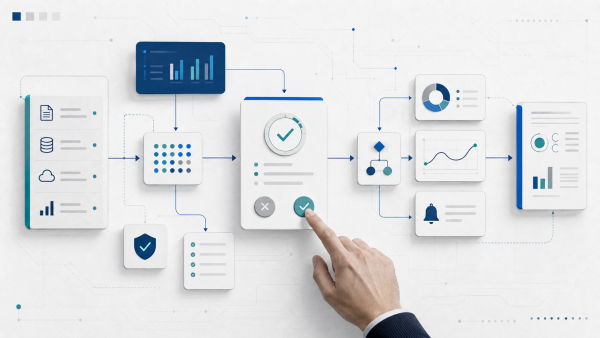
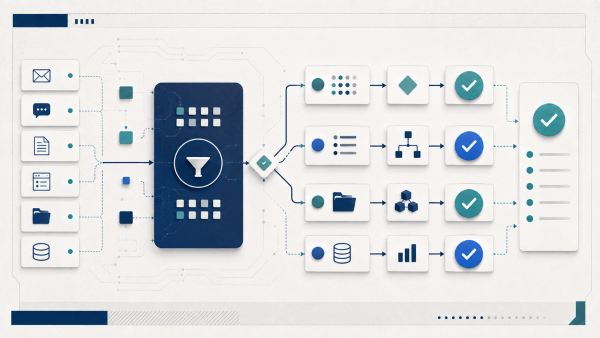
Picture a UK services business that takes enquiries through a website contact form. Twenty a day, no two alike: some are new business, some are existing customers with a quick question, a handful are spam. Right now, someone reads every one of them and decides what happens next. That’s the process this page follows all the way through, because it’s ordinary enough to show what AI automation actually does without needing anything exotic.
Four things make an automation like this work. A trigger starts the process. A decision layer — rules, an AI model, or both — works out what’s actually going on. An orchestration layer carries out whatever needs to happen next across your other systems. And a set of monitoring and review checkpoints catches mistakes and keeps a person involved wherever the outcome matters. This page walks through each of those, using the enquiry example throughout, so you can see what a real AI automation workflow can look like from the moment it starts to the moment it finishes.
If you want the wider picture of what AI automation is and why businesses use it before getting into mechanics, start with What Is AI Automation? The Complete UK Guide. This page assumes you already have that grounding and goes one level deeper.
One quick bit of context before diving in, kept separate because it’s easy to mix up with what follows: 35% of UK businesses with 10 or more employees reported using at least one AI technology as of June 2026, up from around 12% in late 2023.1 That’s a general AI-adoption figure from the ONS — it covers any AI technology, not AI automation specifically — so treat it as background on the direction of travel, not as evidence about how many businesses run workflows like the one below.
The pipeline, at a glance
Here’s the enquiry example laid out as a sequence. The form is submitted. The workflow checks the fields were filled in properly. An AI service works out what kind of enquiry it is. The workflow acts on that decision. A person gets pulled in if the case is ambiguous or valuable enough to warrant it. The whole thing is logged, so the business can see how it’s performing over time.
| Stage | What happens | Typical technology involved |
|---|---|---|
| 1. Trigger | Something starts the process: a form submission, an email, a webhook call, a scheduled time, a new file | Webhooks, scheduled jobs, form handlers, email parsers |
| 2. Data preparation | Raw input is cleaned, structured and validated before anything acts on it | Data-mapping tools, validation rules, OCR/document parsers |
| 3. Decision layer | Rules, a trained model, or a generative/agentic AI service decides what the input means and what should happen next | Rules engines, machine-learning models, large language models |
| 4. Orchestration | The workflow sequences the resulting actions in the right order, across the right systems | Workflow/orchestration platforms, integration middleware |
| 5. Action | The decided outcome is actually carried out: a record is updated, a message is sent, a document is generated | APIs, webhooks, database writes |
| 6. Review and monitoring | Confidence checks, exception handling, human approval and logging run alongside the workflow, not after it as an afterthought | Logging/observability tools, approval queues, dashboards |
Think of that six-stage shape as a lens, not a blueprint. It’s a useful way to think about many event-driven or scheduled AI automation workflows, but it’s an explanatory model, not an architecture every system implements identically. Depending on the tools, the platform and the process involved, stages get combined, reordered, run partly in parallel, or skipped altogether — a simple workflow might run on fixed rules alone and skip a dedicated AI model entirely. The rest of this page takes each stage apart in more detail, using the enquiry example to keep things concrete.
What starts the process
A trigger is the event that tells the system “something has happened, respond to it.” For the enquiry example, that’s the form submission itself, fired as a webhook the moment the visitor clicks send. Other triggers work the same way: an email arriving, a document being uploaded, a scheduled time being reached. In this enquiry example, the trigger is the simplest part of the pipeline — it doesn’t need to understand what arrived, only that something did, and which workflow should pick it up.
Not every automated system is organised around a single discrete trigger like this. Some continuously monitor a data stream instead of waiting for a specific event. This page focuses on the trigger-based pattern, because it’s the shape the enquiry example — and most of what follows — is built on.
Getting the input into shape
Before anything else happens, the raw input needs preparing. For a contact-form enquiry, that means checking the required fields — name, contact detail, enquiry text — are actually present, and validating that the email address looks like an email address. For a document, it might mean extracting text from a PDF or converting a spreadsheet row into a structured record. Either way, anything clearly malformed gets rejected or flagged before it reaches a model or a rule.
This stage matters more than it looks. Skip it, and incomplete, inconsistent or badly formatted data can reduce the reliability of whatever happens next. Validation catches obvious problems before they reach the decision layer and routes unusual cases for review.
Rules, models and AI services — deciding what to do
This is the stage that works out what the input actually means and what should happen next. It can be built in several different ways, often combined within the same workflow.
Fixed rules handle predictable, well-understood cases cheaply and consistently — “if the invoice total is under £500 and the supplier is already approved, pay it automatically.” A trained machine-learning model, such as a classifier trained on past examples, handles cases where the pattern is too complex or too varied to write as an explicit rule — categorising a support ticket, for instance. A generative or agentic AI service — a large language model, used either to generate content or, in an agentic pattern, to decide and take a sequence of actions toward a goal — handles cases involving unstructured language, judgement, or multi-step reasoning. This page treats agentic behaviour only as one possible form this stage can take; see AI Agents for the full treatment of agent architecture and autonomy.
For the enquiry example, this is where an AI service reads the free-text message and works out what it actually is: new business, existing-customer support, or spam. A single workflow can combine more than one of these approaches — rules to handle the predictable part, an AI model for the part that varies. Choosing between them properly is its own question; see AI Automation vs Traditional Automation for that comparison in full.
What the decision layer is actually doing
Whatever form it takes, here’s what the decision layer’s job comes down to. It’s some combination of four things:
- Classification — putting the input into one of a known set of categories (this enquiry is a complaint; this document is an invoice).
- Extraction — pulling specific structured values out of unstructured input (the invoice number, the due date, the amount).
- Prediction — estimating a value or likelihood based on patterns in past data (how likely is this transaction to be fraudulent).
- Generation — producing new content: a draft reply, a summary, a report section.
An invoicing workflow shows how these stack: extract the fields first, then classify whether the invoice matches an existing purchase order, then generate a short summary for the approver — three of the four, chained in one pass.
Carrying out the decision
Once a decision has been made, something has to carry it out — the right actions, in the right order, across the right systems. That’s the orchestration layer’s job. UiPath, for instance, describes this as coordinating models, data, tools and workflows so they behave as one connected process, with access control and governance running alongside the sequencing rather than bolted on afterwards.2
There’s a useful distinction buried in that. A workflow that only sequences steps — do A, then B, then C — is doing conventional workflow orchestration. A workflow that also embeds a model’s decision into that sequence, branching down a different path depending on what a classifier returned, is doing what’s often called AI-driven orchestration. It’s a difference of degree, not two unrelated technologies. This page treats orchestration as one mechanical stage within a single workflow; for the broader planning and tooling questions involved in automating a workflow end to end, see Workflow Automation Explained.
How the pieces actually talk to each other
Orchestration only works because the workflow can reach into other systems — a CRM, an accounting platform, an email service, a database — and both read from and write to them. This happens through APIs, the structured interfaces a system exposes so other software can request data or trigger actions, and webhooks, which let one system notify another the moment something happens rather than being repeatedly asked “has anything changed yet?”
For the enquiry example, this is the CRM lookup, the record write, the notification email — each one a discrete integration point that can succeed, fail, or return something unexpected. That’s part of why the monitoring and exception-handling stages further down this page matter as much as the decision layer itself.
Where the decision actually changes something
The action stage is where the workflow’s decision changes something real: a record is updated, a document is generated, a message is sent, a task is created, a payment is scheduled. This is the point where a wrong decision stops being theoretical and starts having an effect — which is why higher-consequence actions are often routed through a human-approval checkpoint before they’re allowed to execute.
How confident is the system, really?
Some parts of the decision layer expose a numeric confidence score alongside their output. Before you rely on one, it’s worth knowing exactly what it does and doesn’t tell you.
Amazon Textract is one example of a service that exposes element-level confidence scores: it returns a score for each item it identifies, so low-confidence extractions can be routed to human review.3 Amazon Comprehend’s `ClassifyDocument` API is another example of a classification API returning class scores — its response includes a set of classes, each with a confidence score between 0 and 1, where 1 is the highest confidence.4 These scores are a genuinely useful signal, but they aren’t a guarantee of correctness. Test any threshold against your own evaluation data and risk tolerance before relying on it for a decision that matters — don’t just take a vendor’s default number on faith.
Generative-AI services work differently. Amazon Bedrock documents temperature as a randomness control, not a confidence or correctness score: it’s a setting that controls how much variation goes into a generated response, described in Bedrock’s own documentation as “the amount of randomness injected into the response” — a lower value produces more focused, repeatable-looking output, a higher value produces more variety.5 That’s a dial for how varied the output is, not a measure of how likely it is to be right. Reading a low temperature as a sign of confidence is a mistake worth avoiding.
Where no usable confidence score exists, other signals can help instead: a validation check against known reference data (does an extracted total match the purchase order it should relate to), agreement between multiple independent checks, periodic model evaluation against a held-out test set, a fixed business rule (always review transactions above a specific value), or simply sending an entire category of decision to a person by default, regardless of any score.
For the enquiry example, where a usable confidence score does exist, one workable approach is to set a threshold: outputs above it proceed automatically, outputs below it go to a person for review. Where to set that threshold is a decision specific to each workflow and its consequences, and it needs monitoring and periodic validation and adjustment rather than being fixed once and forgotten. This is one way to handle it, not the only way — not every AI system exposes a usable confidence score, and a threshold isn’t the only way a workflow decides what needs a second pair of eyes.
When things do not go to plan
Not every input gets handled cleanly by the decision layer, however well it’s designed: a document in an unexpected format, a classification the model is genuinely unsure about, an API call that fails partway through. A workflow with no defined path for cases like these risks failing silently or behaving unpredictably.
Exception handling means building an explicit path for exactly this: detecting that a case falls outside the normal pattern, routing it somewhere sensible — often a queue for human review — and making sure the workflow’s overall state stays consistent even when one step in it didn’t complete as expected.
Keeping a person in the loop
Human-in-the-loop design means placing a deliberate checkpoint where a person reviews, approves, or corrects an AI-influenced decision before it takes effect, rather than letting every decision run automatically end to end.6 In practice this applies selectively: lower-consequence, high-confidence decisions may run automatically, while higher-consequence decisions, or ones that fell below a confidence threshold, go to a person.
It’s worth being precise about the difference between this and ordinary monitoring, covered next. Human approval happens before an action is allowed to take effect. Monitoring happens around the workflow, on an ongoing basis, whether or not any individual action was reviewed first. Treat these as the same thing and you either lose a genuine safeguard or overestimate how closely a workflow is actually being watched.
Watching how it performs over time
Once a workflow is running, monitoring and evaluation are what let a business tell whether it’s actually working as intended — not only on the day it was built, but months later. That means logging key decisions and actions (so a specific outcome can be traced back to what caused it), tracking accuracy and error rates against expected outcomes, and watching for drift, where a model’s real-world performance quietly declines as the data it encounters shifts away from what it was originally trained or configured on.
A March 2026 NIST report on post-deployment AI monitoring found that best practices, methodologies and terminology in this area remain nascent and scattered across the field, and specifically named model non-determinism and dynamic input conditions as sources of unforeseen output that monitoring needs to catch.7 Monitoring is descriptive: it tells you what’s happening. It doesn’t, by itself, change how the system behaves. That’s a separate job, covered next.
Updating the system when it drifts
When monitoring shows a workflow’s decision layer is no longer performing well — accuracy has dropped, the business process it supports has changed, or new categories of input are turning up that it wasn’t built for — the response is retraining or reconfiguration. Retraining means updating a machine-learning model on new data. Reconfiguration means adjusting rules, thresholds, or the prompt given to an AI service.
Monitoring and retraining are genuinely separate activities, and it’s worth not conflating them. Monitoring identifies that something has changed; retraining or reconfiguration is the deliberate, usually reviewed, action taken in response. A workflow can be closely watched and still be quietly running on a stale model or an outdated rule set, if no one acts on what the monitoring shows.
Who can access what, and who can change it
Because an AI automation workflow can read and write real business data and take real actions, it needs the same security discipline as any other system with that level of access: role-based permissions limiting which systems and data each part of the workflow can reach, access logging and audit trails, and clear ownership of who can change the rules, models, or thresholds it runs on.
If you want a structured way to think this through, the U.S. National Institute of Standards and Technology’s AI Risk Management Framework is one option: a voluntary framework — not a legal requirement — built around four functions: Govern, Map, Measure and Manage, intended to help organisations build trustworthiness considerations into how they design, deploy and evaluate AI systems.8 Adopting a framework like this is a choice available to a business, not something asserted here as legally required.
The enquiry example, start to finish
Now put the whole pipeline back together, using the example that has run through this page.
- Trigger: the form submission fires a webhook to the automation workflow.
- Data preparation: the workflow checks that the required fields are present and validates the email format before proceeding.
- Decision layer: an AI service classifies the enquiry type — new-business enquiry, existing-customer support request, or spam — and extracts key details such as the service being asked about.
- Confidence threshold: if the classification confidence is high, the workflow proceeds automatically; if it’s low, because the enquiry is ambiguous or unusually worded, it goes to a person to classify manually instead.
- Orchestration and action: for a new-business enquiry, the workflow creates a record in the CRM via its API, assigns it to the right team based on the service mentioned, and sends an acknowledgement email to the enquirer.
- Human approval: if the extracted details suggest a higher-value or more complex enquiry, the workflow flags it for a person to review and follow up personally, rather than sending an automated response.
- Logging and monitoring: the classification result, the confidence score, the CRM record created, and whether a person intervened are all logged, so the business can later review how many enquiries were handled automatically versus flagged, and whether the classification is staying accurate as enquiry wording changes over time.
This example deliberately uses ordinary, non-invented figures and outcomes. It illustrates the mechanism, not a specific business’s measured results. For a wider catalogue of similar patterns across other business functions, see AI Automation Examples.
Where this can still go wrong
A few limitations apply generally, not only to the example above.
A confidence score is not a guarantee of correctness — a model can be highly confident and still wrong, and thresholds reduce risk without eliminating it. Integration points can fail: an API can be unavailable, rate-limited, or return an unexpected response shape, and a workflow needs a defined fallback for that rather than an assumption that every call succeeds. Data quality limits everything downstream — no decision layer, rules-based or AI-based, can reliably interpret input that’s incomplete, badly formatted, or inconsistent with what it was designed to handle. Governance takes ongoing effort: permissions, logging and monitoring aren’t a one-time setup step, and need maintenance as the workflow, the data it sees, and the systems it connects to all change over time. And not every process suits this approach — some are better served by fixed rules alone, or aren’t good automation candidates at all. See How to Identify a Process Suitable for AI Automation for a dedicated framework on that question.
Where GrowAILab fits
Understanding the mechanics above is usually the point at which a business starts asking a more specific question: which of these stages needs the most attention in our own workflow, and where are we likely to get it wrong without help. GrowAILab, the implementation partner behind AIAutomation.uk.com, works with UK businesses on exactly this: AI Automation Strategy to decide which workflow to build first, Integration Design to plan how the systems involved will actually connect, and Process Mapping to document the existing process clearly enough that the automation built around it actually reflects how the business works.
If you want a second opinion on how a specific workflow of yours would need to be built, book an AI Automation Audit — it’s the practical next step whether or not you already know which GrowAILab service you’d need.
Frequently asked questions
Does every AI automation workflow need a machine-learning model? No. One practical design combines simple fixed rules with one AI-based step for the part that genuinely varies — not every stage of every workflow needs a trained model or a generative AI service.
What happens when the AI service is not confident in its output? Where a usable confidence score exists, one option is to route lower-confidence outputs to a person for review rather than acting on them automatically. Where the selected service does not provide a usable confidence score — the practical options are validation checks, business rules, or routing an entire category of decision to a person by default instead (see “How confident is the system, really?” above).
Is monitoring the same as keeping the system up to date? No. Monitoring tells you what’s happening; retraining or reconfiguration is the separate, deliberate action taken in response to what monitoring shows (see “Updating the system when it drifts” above).
Do I need a dedicated AI team to build something like this? Not necessarily. Plenty of the stages above are available through existing automation and integration platforms without custom model development. The right approach depends on the specific workflow — exactly what an AI Automation Strategy engagement or an AI Automation Audit is designed to establish.
Sources
- Office for National Statistics — “Artificial intelligence in UK businesses: 2023 to 2026”, accessed 29 July 2026.
- UiPath — “What is AI orchestration?”, accessed 29 July 2026.
- Amazon Textract — Features, accessed 29 July 2026.
- Amazon Comprehend — ClassifyDocument API reference, accessed 29 July 2026.
- Amazon Bedrock — Inference request parameters and response fields for foundation models, accessed 29 July 2026.
- Moxo — “Human in the loop automation: The complete guide to managing workflow exceptions”, accessed 29 July 2026.
- National Institute of Standards and Technology — “Challenges to the monitoring of deployed AI systems” (NIST AI 800-4, 6 March 2026), accessed 29 July 2026.
- National Institute of Standards and Technology — “AI Risk Management Framework”, accessed 29 July 2026.
This article is a general guide, not legal, financial or professional advice.